
Web app on AWS
Needs: Docker, AWS accountThis is Lask applied to a real project: a small full-stack app — a Python API, a React frontend, and all the AWS infrastructure to run them — where every build, test, and deploy step is a Lask task. Follow along and you'll have it running on AWS in about 15 minutes.
Try it right now
You need Lask and Docker. Nothing else — no Python, no Node.js, no Terraform, no AWS CLI, and for this first step, not even an AWS account:
git clone https://github.com/lask-task-runner/lask.git
cd lask/example/01-projects/02-webapp-on-aws
lask sync        # one-time, needs network: fetches the tools module main.lask imports, and pulls the images it uses
lask run test
lask sync is the only step here that touches the network — check, run, and eval never do (that's true even for test, which never calls Terraform or aws-cli itself: the whole file is checked before anything runs, and the tools module is imported at the top of main.lask).
That runs the API's Python tests and the frontend's JavaScript tests, each inside its own container. The toolchains come down as Docker images, and each test runs in a container that is thrown away afterwards; nothing lands on your machine.
What the tasks look like
Everything lives in main.lask. A few excerpts, to give you the shape of it.
Execution environments are values, so they're declared once at the top of the file and referred to by name. Each one comes from lask-module-tools, imported like any other code reuse across projects (import * as tools from "tools", declared once in lask.json and pinned by content hash in lask.lock.json) — a function per tool that returns what to run it in: the image, written here as a head such as #python:3.12.14-alpine3.24, and how to run it:
python = tools.python.env(image = #python:3.12.14-alpine3.24)
node = tools.node.env(image = #node:24.22.1-alpine3.24)
playwright = tools.playwright.env(image = #mcr.microsoft.com/playwright:v1.62.1-jammy)
A command declaration then says which environment provides each program:
command { "python", "pip" } on python schema tools.python.schema
command { "node", "npm", "npx" } on node
command { "aws" } on aws
command { "terraform" } on terraform
command { "curl" } on tools.unix.env()
So a task names only what it runs, and the command words pick the container — which is why you didn't need Python installed:
test_api() = $ pip install -q --no-cache-dir -r api/requirements.txt && python -m unittest discover -s api -p "test_*.py"Pinning the versions in one place means a task can't quietly drift onto a different toolchain than its neighbours. The schema tools gives python and pip checks every command that runs them before anything runs: $ pip instal requests is an error in lask check, not a failed task.
Tasks call other tasks, so you compose them instead of repeating yourself. That's all lask run test was:
test() = do {
  test_api()
  test_web()
}
A command's output can be bound to a variable and interpolated into the next one with #{...}, and a task can declare what it returns:
type Healthcheck = Record<status: String>

healthcheck_web(): Healthcheck = do {
  url = tf_output().website_url
  status = $ curl -s -o /dev/null -w "%{http_code}" "#{url}"
  { status: status }
}
Note the two different environments in one task: tf_output() runs terraform output -json and returns it as a typed record, then curl runs — each in its own container, and neither is installed on your machine.
The tools aren't wrapped: deploy writes $ terraform -chdir=infra apply ... and $ aws s3 sync ... as you would at a prompt. What a tool needs — its image, credentials, region — is given once, in the environment the command word is declared on, rather than repeated at every call site. Marking a value secret keeps it out of the logs, so the key is printed as *** wherever it appears:
aws_access_key_id = mark_secret(get_env("AWS_ACCESS_KEY_ID"))
aws_secret_access_key = mark_secret(get_env("AWS_SECRET_ACCESS_KEY"))
aws_region = get_env("AWS_DEFAULT_REGION")

aws = tools.aws.env(
  image = #amazon/aws-cli:2.36.41,
  access_key_id = aws_access_key_id,
  secret_access_key = aws_secret_access_key,
  region = aws_region
)
What you're building
A cheap, disposable AWS stack.
| Piece | What it does |
|---|---|
| api/ — Python on Lambda | the REST API |
| web/ — React | the frontend |
| S3 (private bucket) + CloudFront | serves the frontend |
| RDS (Postgres) | persistence |
| AWS Cognito | sign-in and authorization (OIDC) |
| infra/ — Terraform | defines all of the above |
Setting up AWS
This is the only fiddly part, and it's AWS's doing rather than Lask's.
You'll need an AWS account and an IAM user (or role) with these managed policies attached: AWSLambda_FullAccess, AmazonRDSFullAccess, AmazonVPCFullAccess, AmazonS3FullAccess, IAMFullAccess, AmazonCognitoPowerUser, AmazonAPIGatewayAdministrator, and CloudFrontFullAccess.
Drop that user's credentials into a .env file in this directory:
cd example/01-projects/02-webapp-on-aws

cat > .env <<'EOF'
export AWS_DEFAULT_REGION=us-west-1
export AWS_ACCESS_KEY_ID=AKIA...
export AWS_SECRET_ACCESS_KEY=...
EOF
.env is already in .gitignore, so it won't end up in a commit. Run source .env before the commands below — that's where the get_env calls you saw above read from.
The full loop
cd example/01-projects/02-webapp-on-aws
source .env

lask run deploy       # infra, build, upload. grab a coffee

lask run create_user you@example.com 'Passw0rd123'   # you'll need this to log in

lask run healthcheck_api
lask run healthcheck_web

# open this URL in a browser and sign in with the user you just created
lask eval --stdout-encode text terraform_output website_url

lask run test_e2e     # optional: a real browser clicking through the app for you

lask run destroy      # done playing around? tear it all down
That's the whole thing. lask run test_api / lask run test_web run one half of test on its own, and test_e2e needs a deployed site and a real user, so it's deliberately kept out of test.
None of this is specific to your laptop, either — a CI job would run the same lask run commands.
Logging in
- Open the site URL from above. You'll land signed out, with a health panel and a Sign in button.
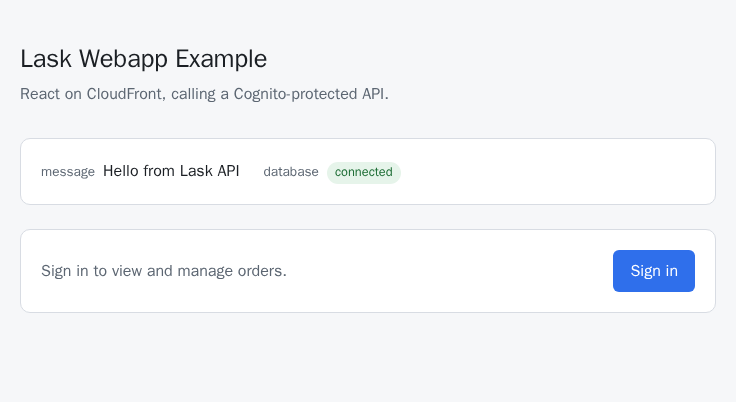
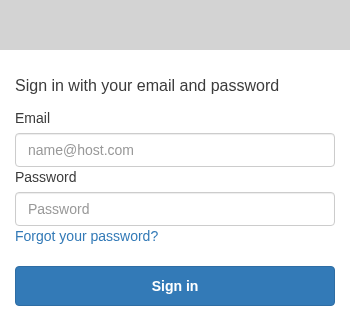
- Click Sign in — Cognito's own Hosted UI takes over. Enter the email and password you gave
create_user(self sign-up is disabled, so that task is the only way to get a login; the password needs 8+ characters with upper/lowercase letters and a digit).
- You're bounced back to the app, now showing an Orders panel — add an order and watch it show up in the table.
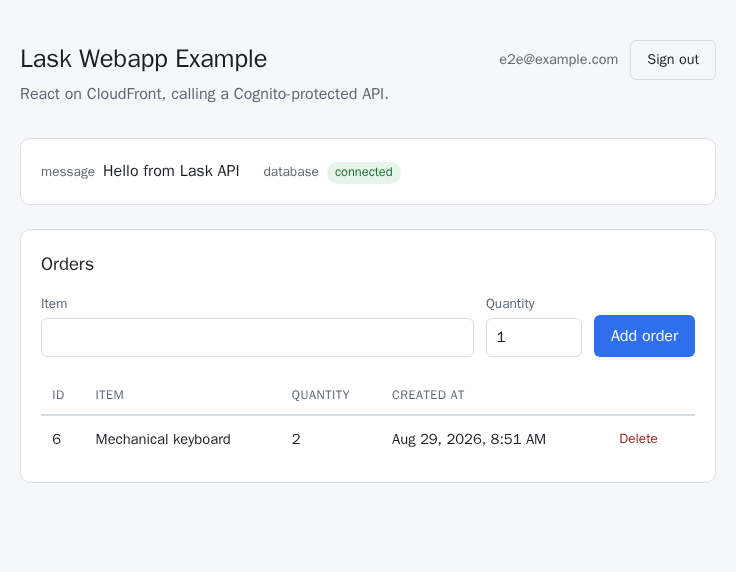
- Sign out ends the Cognito session too, so signing back in asks for your password again rather than letting you straight back in.
Checking it for real
test mocks everything interesting away — fetch, Cognito, the works. lask run test_e2e doesn't: it drives a real browser against the deployed site, signs in through the actual Cognito Hosted UI, and creates, lists, and deletes an order for real (e2e/). It needs E2E_EMAIL and E2E_PASSWORD in .env, matching a user you've already created.
Good to know
- RDS (
db.t4g.micro, single-AZ, 20GB gp3) is billed the whole time it's running (roughly $10-20/month in a US region, plus storage) — runlask run destroyonce you're done. - CloudFront is slow (5-15 minutes to create, 15+ to delete), so
deploy/destroytake longer than you'd expect. - The Lambda lives in your account's default VPC so it can reach RDS (infra/rds.tf). No default VPC in your account/region? Create one first.
The whole project is on GitHub: example/01-projects/02-webapp-on-aws.